College life demands a balance of productivity, organization, and connectivity. Today’s students face academic challenges that require more than just textbooks and notebooks. The right tech gadgets can transform a student’s college experience by enhancing study efficiency, improving dorm life, and keeping them connected to both educational resources and their social networks.
From laptops and smartphones to portable battery packs and noise-canceling headphones, modern campus life runs on technology. Smart investments in tech can help university students manage their workload while maintaining their sanity during those late-night study sessions. Many essential gadgets also serve multiple purposes, saving both space in cramped dorm rooms and money in tight student budgets.
The best part? Many of these tech tools don’t require breaking the bank. From reusable smart notebooks to portable hard drives that protect important assignments, students can find affordable options that deliver significant benefits to their academic performance and overall college experience.
Tech Gadgets Every College Student Needs
Heading to college in 2026? The right tech can make the difference between staying organized and falling behind. Here’s your essential guide to the gadgets that will help you succeed academically while staying connected and entertained.
1. A Reliable Laptop
Your most important investment. Consider:
- MacBook Air M4: Perfect balance of power, battery life (18+ hours), and portability
- Dell XPS 13 or 15: Great Windows alternative with stunning display
- Framework Laptop: For the sustainability-conscious—modular and repairable
Key specs to prioritize: 16GB RAM minimum, 512GB SSD, good battery life (10+ hours)
2. Noise-Canceling Headphones
Essential for studying in noisy dorms or libraries.
- Sony WH-1000XM6: Industry-leading noise cancellation
- Apple AirPods Max 2: Best for Apple ecosystem users
- Budget pick: Anker Soundcore Space Q55
3. Tablet with Stylus
Digital note-taking is a game-changer.
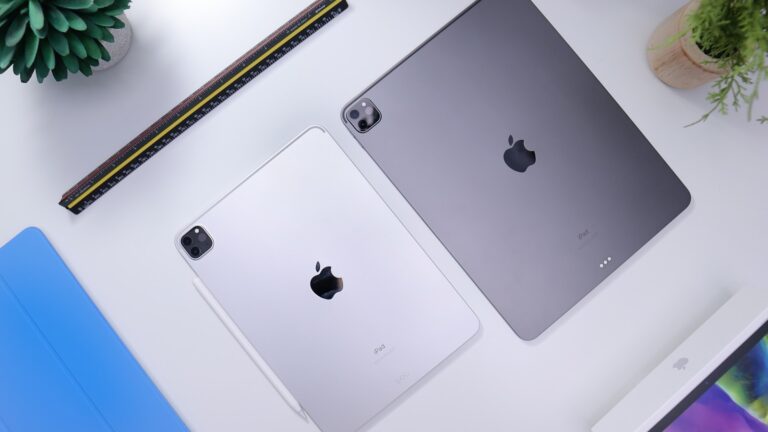
- iPad Air (7th gen) with Apple Pencil Pro: Perfect for notes and textbook annotations
- Samsung Galaxy Tab S10: Best Android option with S Pen included
- reMarkable 3: For distraction-free note-taking
Pro tip: Apps like Notability, GoodNotes, or OneNote make organizing class notes effortless.
4. Portable Charger (Power Bank)
Because outlets in lecture halls are never where you need them.
- Look for 20,000mAh+ capacity
- Multiple ports (USB-C and USB-A)
- Fast charging support
- Recommended: Anker PowerCore 737 or Baseus 65W power bank
5. Smart Watch or Fitness Tracker
Stay on schedule and healthy.
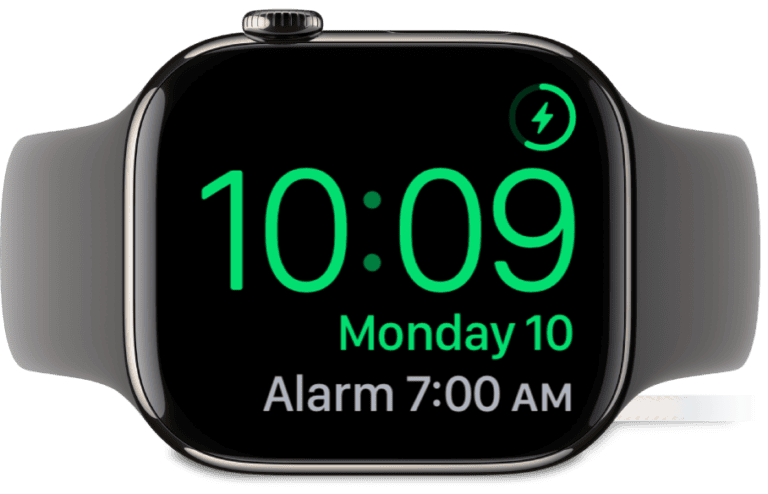
- Apple Watch Series 11: Seamless iOS integration, health tracking
- Samsung Galaxy Watch 7: Best for Android users
- Budget option: Fitbit Charge 7
Track assignments, get notifications, monitor sleep, and stay active between classes.
6. USB-C Hub/Adapter
Modern laptops have limited ports. A good hub provides:
- HDMI output (for presentations)
- USB-A ports (for older devices)
- SD card reader
- Ethernet port
- Additional USB-C charging
Recommended: Anker 10-in-1 USB-C Hub or CalDigit TS4
7. External SSD
Cloud storage is great, but having a physical backup is crucial.
- 1TB minimum for storing large projects, videos, and backups
- Samsung T9: Fast, compact, durable
- Crucial X9: Budget-friendly option
8. Smart Desk Lamp
Better lighting = less eye strain during late-night study sessions.
- BenQ ScreenBar: Clips to monitor, saves desk space
- Dyson Lightcycle: Premium option with auto-adjusting brightness
- Budget: Aukey RGB Desk Lamp with wireless charging
Look for adjustable color temperature and brightness levels.
9. Wireless Earbuds
For quick listening between classes.
- Apple AirPods Pro 3: Best for iPhone users, improved hearing health features
- Samsung Galaxy Buds 3 Pro: Excellent Android integration
- Budget: Nothing Ear (3) or Soundcore Liberty 4 Pro
10. Portable Monitor
Expand your workspace in a cramped dorm.
- 13-15 inch USB-C powered displays
- ASUS ZenScreen or Espresso Display 15
- Doubles productivity for research and multitasking
11. Smart Plugs and LED Strip Lights
Make your dorm room functional and personalized.
- Control lamps with voice commands or apps
- Set schedules to save energy
- Create the perfect study atmosphere
- Govee and Philips Hue are top choices
12. Webcam with Good Audio
Built-in laptop cameras won’t cut it for online classes and interviews.
- Logitech Brio 500: 4K quality, AI framing
- Razer Kiyo Pro Ultra: Excellent low-light performance
- Pair with a Blue Yeti Nano mic for crystal-clear audio
13. E-Reader
Save money on textbooks and carry your whole library.
- Kindle Paperwhite Signature (2026): Perfect for novels and lighter reading
- Kobo Libra Colour: Supports more formats, color E Ink
- Many textbooks now available in digital format
14. Cable Organizer Kit
Keep all those charging cables tangle-free.
- Cable clips for your desk
- Velcro ties for travel
- Small tech pouch for accessories
- Trust us, future you will be grateful
15. Backup Storage Solution
Follow the 3-2-1 rule: 3 copies, 2 different media, 1 offsite.
- External SSD (mentioned above)
- Cloud storage subscription (Google One, iCloud+, OneDrive)
- Automatic backups save you from disaster before major deadlines
Budget-Friendly Shopping Tips
- Look for student discounts: Apple, Microsoft, Dell, and Samsung offer 10-20% off with .edu email
- Buy refurbished: Certified refurbished tech can save you 30-50%
- Wait for sales: Back-to-school sales (July-September) offer the best deals
- Check if your school provides anything: Some colleges include laptops or software licenses
Final Thoughts
You don’t need everything on this list day one. Prioritize a solid laptop, good headphones, and a reliable way to take notes. Add other gadgets as you discover what your specific classes and lifestyle require.
The best tech setup is one that helps you focus on learning, not one that breaks the bank or creates more distractions. Choose quality over quantity, and your gadgets should last you through graduation and beyond.
Key Takeaways
- Tech gadgets like noise-canceling headphones and portable battery packs provide crucial support for students’ academic success and campus life.
- Investing in multi-purpose technology helps college students maximize limited dorm space while staying organized and connected.
- Quality tech accessories enhance both learning efficiency and entertainment options for university students on a budget.
Essential Gadgets for the Academic Rigor
College students need specific tech tools to handle demanding coursework and maintain productivity. The right devices can make a significant difference in managing assignments, research, and study sessions.
Reliable Laptops for College Students
A reliable laptop is a must-have gadget for any college student tackling academic challenges. When selecting a laptop, students should prioritize performance, battery life, and portability.
Key features to consider:
- Minimum 8GB RAM for multitasking
- SSD storage for faster boot times and file access
- At least 8 hours of battery life
- Lightweight design (under 4 pounds)
MacBooks are popular for their reliability and longevity, while Windows laptops offer more variety in price points. For STEM majors, computers with dedicated graphics cards and extra processing power may be necessary for specialized software.
Many universities offer student discounts on laptops from major manufacturers like Dell, HP, and Apple. These savings can make premium devices more accessible.
Tablets and iPads for Versatile Learning
Tablets provide flexibility that traditional laptops can’t match. They’re perfect for reading digital textbooks, taking notes in lectures, and reviewing material during quick study breaks.
Best uses for tablets in academics:
- Digital note-taking with stylus support
- E-textbook reading with highlighting features
- Recording lectures
- Creating diagrams and mind maps
- Portable second screen for research
The iPad with Apple Pencil has become a favorite among students for its intuitive note-taking apps like Notability and GoodNotes. Android alternatives from Samsung and Microsoft Surface tablets offer similar functionality at various price points.
Many students find that a tablet complements rather than replaces a laptop, creating a powerful tech ecosystem for different academic situations.
USB-C Hubs and Flash Drives for Data Transfer
Modern portable hard drives and flash drives remain essential despite cloud storage options. These devices ensure students can access their work even without internet connectivity.
Recommended storage solutions:
- USB-C hub with multiple ports (HDMI, USB-A, SD card reader)
- 64GB+ flash drive for quick file transfers
- 1TB+ external SSD for backup and large file storage
A quality USB-C hub transforms a minimalist laptop into a connectivity powerhouse, allowing students to connect to projectors for presentations or external monitors for extended study sessions.
For collaborative projects, flash drives provide a quick way to share large files between classmates. Additionally, maintaining backups on external drives protects against computer failures during crucial exam periods or when important assignments are due.
Maximizing Productivity and Focus
College students need the right tech tools to stay focused during long study sessions and maintain productivity throughout busy days. The right gadgets can make a significant difference in academic performance.
Noise-Canceling Headphones for Study Sessions
Noise-canceling headphones are a game-changer for college students trying to focus in noisy environments. These devices use advanced technology to block out surrounding sounds, creating a bubble of concentration.
Top brands like Sony, Bose, and Apple offer options with different price points and features. The best noise-canceling headphones provide:
- 20+ hours of battery life
- Comfortable ear cushions for extended wear
- Bluetooth connectivity
- Built-in microphones for calls
Students should look for models with “transparency mode” that allows important sounds through when needed. This feature is particularly helpful when studying in public spaces where awareness of surroundings remains important.
Some headphones even offer study-focused sound profiles that enhance concentration with white noise or subtle background sounds.
Portable Phone Chargers for Extended Battery Life
A dead phone battery can disrupt a student’s entire day. Portable battery packs have become essential for maintaining connectivity during long days on campus.
Modern power banks offer impressive capabilities:
| Feature | Entry-Level | Mid-Range | Premium |
|---|---|---|---|
| Capacity | 5,000mAh | 10,000mAh | 20,000mAh+ |
| Device Charges | 1-2 | 2-4 | 4+ |
| Charging Speed | Standard | Fast | Ultra-Fast |
| Price Range | $15-25 | $30-50 | $50-100+ |
Students should consider models with multiple ports to charge several devices simultaneously. The newest chargers include both USB-C and USB-A outputs to accommodate various devices.
Weight matters too—lightweight options (under 8 ounces) fit easily in backpacks without adding significant bulk. Some premium models even offer wireless charging capabilities for compatible phones.
Optimizing Your College Living Space
Transforming a small dorm room into a functional and comfortable space requires strategic gadget choices. The right tech can enhance entertainment options, simplify meal preparation, and maximize limited square footage.
Smart Entertainment Devices for Downtime
College life demands balance between studying and relaxation. A compact smart speaker like the Amazon Echo Dot or Google Nest Mini serves multiple functions—playing music, answering questions, and controlling other smart devices. These speakers take minimal space while delivering quality sound for dorm room entertainment.
For movie nights with roommates, a mini projector creates a theater experience without a bulky TV. Many modern options are portable and can turn any wall into a screen for Netflix or gaming sessions.
Speaking of gaming, consider compact options like the Nintendo Switch or handheld gaming devices that don’t require dedicated TV space but still provide quality entertainment during breaks.
Wireless headphones are essential for enjoying entertainment without disturbing roommates, especially during late-night streaming or gaming sessions.
Air Fryers for Quick and Healthy Cooking
When cafeteria food becomes repetitive, an air fryer offers a perfect solution for in-room cooking. These compact appliances use minimal counter space while providing numerous meal options.
Most models can cook frozen foods, vegetables, and proteins with little to no oil, making them perfect for health-conscious college students. Air fryers typically operate with simple controls and require minimal cleanup—ideal for busy academic schedules.
Look for mini air fryers specifically designed for small spaces. Some models come with multiple cooking functions, allowing students to bake, roast, and reheat without needing several appliances.
The time-saving benefit cannot be overstated; most meals cook in 10-15 minutes, perfect for quick bites between classes or late-night study sessions.
Compact and Efficient Room Organization Tools
Smart storage solutions help maximize every inch of limited dorm space. Consider under-bed storage containers with wheels for easy access to seasonal clothing or extra supplies.
Wall-mounted charging stations keep multiple devices powered while eliminating cord clutter. Many options include USB ports and designated spaces for phones, tablets, and watches, optimizing residents’ tech experiences.
Bed risers with built-in USB ports serve dual purposes—creating additional storage space under the bed while providing convenient charging options.
Multi-purpose furniture like storage ottomans provide seating, storage, and sometimes even charging capabilities. LED strip lights with remote controls can transform the ambiance without taking up valuable surface area.
Collapsible or over-the-door organizers maximize vertical space for everything from shoes to school supplies, keeping essentials accessible without cluttering limited floor space.
Staying Connected and Entertained
College students need reliable ways to connect their devices and enjoy entertainment during study breaks. Modern connectivity options help maintain productivity while quality entertainment setups provide necessary downtime.
Bluetooth-Enabled Devices for Seamless Connectivity
Bluetooth technology has revolutionized how students interact with their devices. Wireless headphones allow students to listen to lectures or music without tangled cords, providing freedom of movement during study sessions.
Portable Bluetooth speakers are perfect for dorm gatherings or solo study sessions with background music. Many models offer 10+ hours of battery life and are compact enough to fit in a backpack.
Bluetooth keyboards and mice eliminate desk clutter and pair effortlessly with laptops and tablets. These accessories enhance productivity without the hassle of additional wires.
Smart watches with Bluetooth connectivity help students manage notifications discreetly during classes while maintaining connection to their smartphones. They also track health metrics—valuable during stressful exam periods.
HDMI Cables for Multi-Display Setups
A high-quality HDMI cable is essential for extending laptop displays to external monitors or TVs. This setup dramatically improves productivity for research projects and assignments requiring multiple windows.
When selecting HDMI cables, students should choose ones with the latest standards (HDMI 2.0 or higher) to support 4K content. USB desk accessories can complement this setup for optimal organization.
For entertainment purposes, HDMI connections allow students to stream movies and TV shows from laptops to larger screens. This transforms a standard dorm room into a mini theater for weekend movie nights with friends.
Many campus housing situations have Wi-Fi limitations. HDMI cables provide a reliable alternative for streaming services when wireless connectivity becomes unstable during peak usage hours.
Ensuring Constant Access to Learning Resources
Modern education relies heavily on digital resources and online platforms. Students need reliable connectivity to access educational materials anytime and anywhere for successful academic performance.
High-Speed Wi-Fi Routers for Uninterrupted Internet
A high-quality Wi-Fi router is an essential investment for college students. During online classes, slow connections can result in missed information and frustrating delays that impact learning outcomes.
The latest Wi-Fi 6 routers offer significant improvements over previous generations, providing faster speeds and supporting more connected devices simultaneously. This is particularly valuable in dormitories or shared apartments where multiple students might be online.
For extended study sessions, a router with strong range capabilities ensures connectivity throughout the living space. Students should look for models with:
- Dual or tri-band capabilities
- Beamforming technology
- QoS (Quality of Service) features to prioritize academic applications
- Simple setup options via smartphone apps
Many campuses offer Wi-Fi, but signal strength varies by location. A portable Wi-Fi extender can help students maintain reliable connections in areas with weaker coverage, ensuring they never miss important updates or assignment deadlines.
Frequently Asked Questions
College students face many technology choices as they prepare for campus or online learning. These questions address the most common concerns about tech gadgets that can improve academic performance and daily student life.
What essential tech gadgets should college students invest in for academic success?
A reliable laptop stands as the most crucial investment for academic success. Look for one with at least 8GB of RAM and an i5 processor or equivalent for smooth multitasking.
Noise-cancelling headphones help students focus in noisy environments like dorms or libraries. They create a personal study bubble even in crowded spaces.
A portable charger or power bank prevents technology interruptions during long days on campus. This simple gadget ensures devices remain powered through extended study sessions or back-to-back classes.
Which gadgets are most beneficial for college students taking online classes?
A webcam with HD quality improves online class participation and group project meetings. Many laptops include built-in cameras, but external options often provide better clarity.
A quality microphone ensures clear communication during virtual discussions. Students who speak clearly during online classes tend to participate more effectively.
External monitors expand screen real estate for better multitasking during online learning. This setup allows students to view lecture materials on one screen while taking notes on another.
What are the top recommended study gadgets for college students to enhance their productivity?
Smart notebooks like Rocketbook allow students to digitize handwritten notes instantly. These reusable notebooks save paper while making notes searchable and shareable.
Time management apps paired with smartwatches help students track study sessions and breaks. The physical reminder on their wrist helps maintain focus and productive scheduling.
E-readers reduce eye strain during extensive reading assignments. They also lighten backpack loads by storing hundreds of books and articles in one slim device.
What devices are considered crucial for college students’ everyday use?
Smartphones serve as all-in-one communication, organization, and research tools. Most students already own these but should consider educational apps to maximize their utility.
Portable speakers enhance dorm life for entertainment and social gatherings. Compact, water-resistant models work well for shared living spaces.
External hard drives or cloud storage solutions protect important coursework from device failures. Regular backups prevent catastrophic data loss during crucial academic periods.
How can technology improve the note-taking process for college students?
Digital styluses paired with tablets create a natural writing experience while automatically organizing notes. This combination bridges the gap between handwritten notes and digital organization.
Voice recording apps capture lectures for later review. Students can focus on understanding concepts in class rather than frantically writing everything down.
Note-taking software with organizational features helps students structure information logically. Programs like OneNote or Evernote allow tagging, searching, and linking related content across subjects.
What are the best writing tools and gadgets for students to assist with their assignments?
Grammar and plagiarism checking software helps students improve writing quality. These tools catch errors professors might penalize and ensure academic integrity.
Ergonomic keyboards reduce strain during long writing sessions. Comfortable typing equipment becomes increasingly important during exam periods and thesis writing.
Citation management software saves time formatting bibliographies and references. Tools like Zotero or Mendeley automatically generate citations in required academic styles.