In today’s digital world, cybercriminals are constantly developing new ways to steal personal information and money. These digital thieves use various techniques from phishing emails to malware attacks, targeting everyone from individuals to large companies. Protecting yourself online requires a combination of good habits, security tools, and awareness of common threats.
Cybersecurity doesn’t have to be complicated. Simple steps like using strong passwords, enabling multifactor authentication, and keeping your software updated can greatly reduce your risk. When you turn on multifactor authentication, you add an extra layer of protection that makes it much harder for criminals to access your accounts.
Being alert when connected to the internet is crucial for preventing cyber intrusions. Before clicking links or downloading attachments, take a moment to verify they’re legitimate. The FBI recommends taking the right security measures and staying vigilant as key ways to prevent online crimes. Remember that complementary cybersecurity and law enforcement capabilities are essential for safeguarding our digital spaces.
In 2026, cybercrime has become more sophisticated than ever, with attackers using AI-generated deepfakes, automated phishing bots, and advanced ransomware. However, most cyberattacks still rely on human error or preventable security gaps.
Here is a comprehensive guide to building a “digital fortress” around your personal and professional life.
1. Master Your Authentication (The “Passkey” Era)
Traditional passwords are the weakest link in security. In 2026, we have moved beyond simple text passwords.
- Adopt Passkeys: Whenever possible, use Passkeys (supported by Apple, Google, and Microsoft). They use your device’s biometrics (FaceID/Fingerprint) to log you in, making them virtually impossible to phish because there is no “password” for a hacker to steal.
- Use a Password Manager: For sites that don’t support Passkeys, use a manager like 1Password, Bitwarden, or iCloud Keychain. Never reuse a password across two different sites.
- Mandatory MFA: Enable Multi-Factor Authentication on every account. Avoid SMS-based codes if possible, as “SIM swapping” is a common attack. Use authenticator apps (like Google Authenticator) or physical security keys (like YubiKeys).
2. Guard Against AI-Driven Social Engineering
Cybercriminals now use AI to clone voices and generate perfect, typo-free emails.
- The “Safe Word” Strategy: Establish a secret “safe word” with your family members. If you receive a frantic call from a “loved one” (whose voice may be AI-cloned) asking for money or info, ask for the safe word.
- Verify the Source: If you receive an urgent email from your bank or boss, do not click the link. Instead, go directly to the official website or app, or call the person back using a trusted number from your contacts.
- Zero Trust Policy: Treat every unsolicited text, DM, or email as a potential threat until proven otherwise.
3. Maintain “Software Hygiene”
Hackers look for “open windows”—known security flaws in old software.
- Enable Auto-Updates: Set your smartphone, computer, and smart home devices (IoT) to update automatically. These updates often contain “patches” for security holes that hackers are currently exploiting.
- Audit Your Apps: Delete apps you no longer use. Every app on your phone is a potential entry point for data harvesting or malware.
- Replace “End-of-Life” Hardware: If you are using an old router or phone that no longer receives security updates, it is a major liability. It is time to upgrade to a supported device.
4. Secure Your Network
Your home Wi-Fi is the gateway to all your devices.
- Rename and Shield Your Wi-Fi: Change your router’s default name (SSID) and password. Use WPA3 encryption if your router supports it.
- Use a VPN on Public Wi-Fi: Never log into your bank or sensitive accounts while on airport or coffee shop Wi-Fi without a reputable VPN (Virtual Private Network).
- Disable “Auto-Join”: Set your phone to not automatically join open Wi-Fi networks. Hackers often set up “Evil Twin” hotspots with names like “Free Airport Wi-Fi” to intercept your data.
5. Protect Your Financial Footprint
Cybercriminals are ultimately after your money or your identity.
- Use Virtual Credit Cards: Services like Privacy.com or features within your banking app allow you to create “burner” card numbers for online shopping. If the site is hacked, your real card remains safe.
- Freeze Your Credit: If you aren’t planning on taking out a loan soon, freeze your credit with the major bureaus (Equifax, Experian, TransUnion). This prevents criminals from opening new lines of credit in your name even if they have your Social Security number.
- Monitor Statements: Set up “Transaction Alerts” on your phone so you get a notification every time a dollar is spent.
6. Backup Your Data (The Ransomware Shield)
If a cybercriminal manages to lock your computer (Ransomware), your only leverage is a backup.
- The 3-2-1 Rule: Keep 3 copies of your data, on 2 different media types (e.g., Cloud and External Hard Drive), with 1 copy stored off-site (or disconnected from your network).
- Disconnect Backups: If your backup drive is constantly plugged into your computer, ransomware can encrypt the backup too. Plug it in, back up, and unplug it.
7. Be Careful What You Share (OSINT Prevention)
Cybercriminals use “Open Source Intelligence” (OSINT) to gather info about you from social media to guess your security questions or craft a believable scam.
- Private Profiles: Keep your social media accounts private.
- Avoid “Quizzes”: Those “What was your first car?” or “What city were you born in?” Facebook memes are often designed to harvest answers to common security questions.
- Don’t Post Travel Plans: Posting that you are “Away for two weeks!” tells criminals exactly when your home network (and physical home) is most vulnerable.
Summary Checklist:
- Passkeys enabled? (Yes/No)
- MFA on every account? (Yes/No)
- Auto-updates on? (Yes/No)
- Family Safe Word established? (Yes/No)
- Credit Frozen? (Yes/No)
Key Takeaways
- Using strong passwords and enabling multifactor authentication significantly increases your online security against unauthorized access.
- Regular software updates and trusted antivirus programs help protect your devices from the latest cyber threats and vulnerabilities.
- Practicing caution with emails, links, and attachments can prevent most phishing attacks and keep your personal information secure.
Understanding Cybercrime and Cybercriminals
Cybercrime continues to evolve as technology advances, with criminals developing sophisticated methods to target individuals and organizations. These digital threats can range from simple scams to complex attacks that compromise sensitive information and systems.
Types of Cyber Threats
Cybercrime encompasses any criminal activity involving computers, networks, or internet-connected devices. Common types include:
- Identity Theft: Criminals steal personal information to impersonate victims and commit fraud.
- Financial Fraud: Unauthorized access to bank accounts or credit cards to steal money.
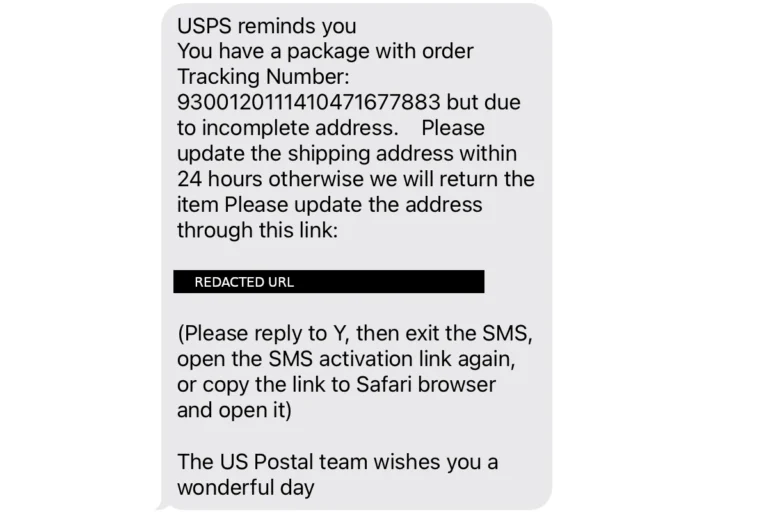
- Phishing: Deceptive communications designed to trick people into revealing sensitive information.
- Ransomware: Malicious software that encrypts files until a ransom is paid.
- Data Breaches: Unauthorized access to databases containing personal or financial information.
These threats affect both individuals and businesses. Large corporations may face targeted attacks while everyday internet users encounter credential theft attempts and fraudulent websites.
Common Techniques Used by Cybercriminals
Cybercriminals employ various strategies to accomplish their goals. Many rely on social engineering tactics that manipulate human psychology rather than technical vulnerabilities.
Some prevalent techniques include:
- Phishing emails that mimic legitimate organizations to harvest credentials
- Malware distribution through infected attachments or downloads
- Man-in-the-middle attacks where criminals intercept communications
- Password attacks using brute force or stolen password databases
- Exploiting software vulnerabilities before they’re patched
Criminals often combine these methods for maximum effectiveness. For example, they might use phishing to deliver malware, then use the infected computer to spread to other systems.
The most successful cyber criminals blend technical skills with psychological manipulation. They study human behavior to identify weaknesses in both systems and people’s decision-making processes.
Creating and Managing Strong Passwords
Effective password management is one of the simplest yet most powerful defenses against cybercriminals. Strong passwords serve as the first line of protection for your digital accounts and sensitive information.
Principles of Strong Password Creation
A strong password should be at least 16 characters long. The longer your password, the harder it is for hackers to crack it using automated tools.
Never include personal information such as your name, birth date, username, or email address in your passwords. This information is often easily available to cybercriminals.
Make passwords complex by using a mix of:
- Uppercase letters
- Lowercase letters
- Numbers
- Special characters (!, @, #, $, etc.)
Avoid using common words or phrases that appear in dictionaries. Hackers use programs that can quickly test millions of dictionary words.
Use different passwords for each account. This prevents a security breach on one site from affecting all your accounts.
Password Management Tools
Password managers are applications that create, store, and fill in passwords automatically. They generate random, complex passwords that would be difficult to remember on your own.
Most password managers encrypt your stored passwords, adding an extra layer of security. They only require you to remember one master password to access all your other passwords.
Popular password manager features include:
- Auto-fill capabilities for websites and apps
- Password strength checkers to evaluate your existing passwords
- Secure password sharing with trusted contacts
- Multi-factor authentication for added protection
Many password managers also alert users when their accounts may have been compromised in data breaches. This early warning system helps people change affected passwords quickly.
Implementing Multifactor Authentication
Multifactor authentication (MFA) serves as a critical defense against unauthorized access to your accounts and systems. This security measure requires users to provide additional verification beyond just a password.
Benefits of Multifactor Authentication
MFA prevents unauthorized access to data and applications by requiring a second method to verify identity. This simple step dramatically increases security against common cyber attacks.
When cybercriminals obtain stolen passwords, MFA creates an additional barrier that can stop an attack in its tracks. Without the second verification factor, hackers cannot proceed further into the system.
Organizations implementing MFA have reported up to 99.9% reduction in account compromise attacks. This makes it one of the most cost-effective security measures available today.
MFA also helps businesses comply with various regulations and security frameworks that increasingly mandate stronger authentication methods beyond passwords alone.
How to Set Up Multifactor Authentication
Setting up MFA typically involves these steps:
Choose your MFA method: Options include:
- Text message codes
- Authentication apps (Google Authenticator, Microsoft Authenticator)
- Hardware security keys
- Biometric verification (fingerprint, face recognition)
Enable MFA on critical accounts first: Start with email, banking, cloud storage, and business systems that contain sensitive information.
Companies should make passwords sufficiently complex using letters, numbers, and special characters as the first authentication layer. Then add the second factor for complete protection.
Many services provide built-in MFA options in their security settings. Look for terms like “two-factor authentication,” “2FA,” or “additional verification” in account settings menus.
Navigating Public Wi-Fi and Network Security
Using public Wi-Fi exposes users to significant security risks that cybercriminals exploit to steal personal information. Smart security practices can protect your data when connecting to networks in cafes, airports, and other public locations.
Risks of Public Wi-Fi
Public Wi-Fi networks are often not secure, making them prime targets for cybercriminals. When you connect to these networks, hackers can potentially intercept your data through various attack methods.
“Man-in-the-middle” attacks occur when criminals position themselves between your device and the connection point. This allows them to intercept information you’re sending, including passwords and credit card details.
Another risk is “evil twin” networks – fake hotspots set up to mimic legitimate networks. These fraudulent connections can look identical to real public Wi-Fi but are designed to steal your information.
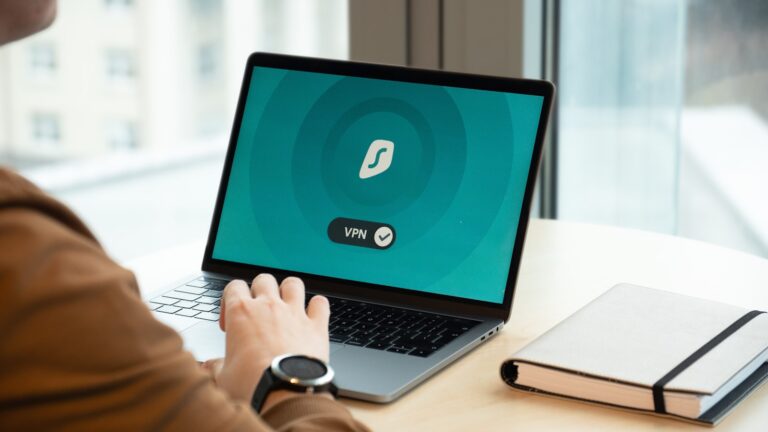
To protect yourself, use a Virtual Private Network (VPN) when connecting to public Wi-Fi. VPNs encrypt your data, making it unreadable to potential eavesdroppers.
Protected HTTPS Connections
When browsing on public Wi-Fi, always check for HTTPS encryption in your browser’s address bar. HTTPS creates a secure connection between your browser and the website you’re visiting.
Look for the padlock icon next to the website address. This indicates the site uses encryption to protect data transmitted between your device and the server.
Tips for safer public Wi-Fi browsing:
- Verify the website address is correct before entering credentials
- Enable multi-factor authentication on important accounts
- Avoid accessing sensitive accounts (banking, email) on public networks
- Turn off automatic Wi-Fi connections on your devices
Sensitive transactions should be avoided on public Wi-Fi whenever possible. Wait until you’re on a secure, private network before accessing financial accounts or making online purchases.
Recognizing and Avoiding Phishing Scams
Phishing scams remain one of the most common ways cybercriminals steal sensitive information. These deceptive tactics trick users into revealing passwords, financial details, and personal data through fake communications.
Identifying Phishing Emails and Websites
Phishing emails often contain several tell-tale signs. They typically create a sense of urgency or include threats to pressure recipients into acting quickly without thinking critically.
Look for these warning signs:
- Poor grammar and spelling: Professional organizations rarely send communications with obvious language errors
- Mismatched or suspicious URLs: Hover over links before clicking to see the actual destination
- Generic greetings: “Dear Customer” instead of your name suggests mass-sent phishing
- Requests for sensitive information: Legitimate companies won’t ask for passwords or account details via email
Suspicious websites often have slight misspellings of legitimate domains (like “amaz0n.com”). Security software can help identify these fake sites before they cause harm.
Best Practices for Handling Phishing Attempts
When dealing with unsolicited emails, it’s best to maintain a healthy skepticism. Users should never click links in suspicious messages or download unexpected attachments, as these often contain malware.
Protective measures to implement:
- Install anti-phishing toolbars on web browsers
- Use multi-factor authentication for important accounts
- Keep all software and operating systems updated
- Verify requests by contacting organizations directly through official channels
If someone suspects they’ve encountered a phishing attempt, they should report it to their IT department or forward it to [email protected]. Regular security awareness training helps employees recognize increasingly sophisticated phishing attacks.
Always trust your instincts – if something seems suspicious, it probably is.
Protecting Personal and Financial Data
Keeping personal and financial information secure requires proactive measures in today’s digital world. Cybercriminals constantly develop new tactics to steal sensitive data, making vigilance essential.
Secure Handling of Sensitive Information
Never share personal data like Social Security numbers, bank account details, or passwords via email or unsecured websites. Install anti-virus software and a firewall on all devices to create a protective barrier against malware.
Consider using a password manager to generate and store complex passwords. This prevents the common mistake of using the same password across multiple sites.
Protect physical documents containing sensitive information by shredding them before disposal. Identity thieves often resort to “dumpster diving” to find discarded financial statements.
One powerful protective measure is to freeze your credit. This prevents new accounts from being opened in your name without your explicit permission.
Dedicate separate devices for financial transactions versus general browsing when possible.
Monitoring Financial Transactions
Set up automatic alerts from financial institutions to notify you of unusual account activity. Many banks offer customizable notifications for transactions exceeding specified amounts.
Review credit reports regularly from all three major bureaus (Equifax, Experian, and TransUnion). Consumers are entitled to one free report annually from each bureau.
Be wary of unexpected calls requesting contact information or financial details, even if the caller ID appears legitimate. Fraud schemes often involve phone calls with spoofed telephone numbers.
Use secure, encrypted connections when accessing financial websites. Look for “https” and a padlock icon in the browser address bar before entering any sensitive information.
Consider using virtual credit card numbers for online purchases. These temporary numbers link to your actual account but limit exposure if compromised.
Using Anti-Virus and Anti-Malware Solutions
Protective software serves as a critical defense layer against cyber threats. These tools work continuously to detect, block, and remove malicious programs before they can harm your devices or steal your data.
Choosing the Right Anti-Virus Software
When selecting anti-virus protection, look for software that offers real-time scanning capabilities to catch threats as they appear. Native antivirus solutions built into operating systems provide basic protection, but dedicated security programs often offer more comprehensive coverage.
Consider programs that protect against multiple threat types including ransomware, which locks your files until you pay a fee. Many premium options include additional security features like:
- Firewall protection
- Email scanning
- Web browsing protection
- Password managers
Free options can provide basic protection, but paid solutions typically offer faster updates and better customer support. For businesses or individuals with sensitive data, investing in robust security software is especially important.
Regular Scanning and Software Updates
Anti-virus software requires consistent maintenance to remain effective. Cybercriminals constantly develop new techniques to evade detection, making regular updates crucial for maintaining protection.
Set up automatic updates for both your operating system and security software. These updates patch security vulnerabilities that malicious software might exploit. Most modern anti-virus programs update daily or even hourly to combat emerging threats.
Schedule regular system scans at least weekly. These comprehensive checks can find dormant malware that might have slipped past real-time protection. Many experts recommend:
- Quick scans daily (takes minutes)
- Full system scans weekly (more thorough)
- Custom scans for external devices before use
Keep all software updated, not just security programs. Many malware attacks target outdated software with known vulnerabilities. Enabling automatic updates across all applications provides an additional layer of protection against sophisticated cyber threats.
Staying Informed and Reporting Cyber Fraud
Awareness and action form the backbone of effective cybersecurity defense. Knowing where to find reliable information about new threats and understanding how to report incidents when they occur can significantly reduce your vulnerability to cyber criminals.
Keeping Up with the Latest Cybersecurity Trends
Cybercriminals constantly develop new tactics, making it essential to stay informed about current threats. The Cybersecurity and Infrastructure Security Agency (CISA) provides regular updates on emerging cyber threats and recommended protective measures.
Subscribe to cybersecurity newsletters from reputable organizations. Many security firms offer free threat intelligence reports that explain new scams in plain language.
Follow trusted cybersecurity experts on social media platforms. They often share timely alerts about breaking threats before they become widespread.
Set up Google Alerts for keywords like “data breach,” “ransomware,” or “phishing campaign” to receive notifications about new threats.
Many banks and financial institutions provide security bulletins to their customers. These often contain practical advice about protecting digital information relevant to financial security.
Reporting Cybercrime to Authorities
If someone becomes a victim of cyber fraud, prompt reporting is crucial. The FBI’s Internet Crime Complaint Center (IC3) serves as the primary federal reporting mechanism for online crimes. Filing a report helps authorities track cyber criminals and may assist in recovering lost funds.
Key information to include when reporting:
- Dates and times of incidents
- Details of suspicious communications
- Account numbers or transaction information
- Copies of malicious emails or screenshots
- Amount of financial loss (if applicable)
Many financial institutions have dedicated fraud departments. Contacting them immediately after discovering suspicious activity can help limit losses and trigger fraud investigations.
State and local law enforcement agencies should also be notified, especially for cases involving significant financial harm. The FDIC recommends reporting all financial fraud immediately to minimize potential damage.
Remember that reporting helps not only the victim but also contributes to the broader fight against cybercrime by helping authorities identify patterns and perpetrators.
Frequently Asked Questions
Cybercrime prevention requires specific actions across different environments. These questions address key protection measures for individuals, businesses, and organizations.
What measures can individuals take to protect themselves from cyber attacks?
Individuals should use strong passwords and avoid reusing them across multiple accounts. Creating complex passwords with a mix of letters, numbers, and symbols makes them harder to crack.
Turn on multifactor authentication (MFA) whenever possible, as this adds an extra layer of security beyond just a password. This typically involves receiving a code on your phone or email to complete the login process.
Regular software updates are crucial since they often contain security patches for vulnerabilities. Set devices to update automatically whenever possible.
Be cautious about clicking links in emails or messages, especially those asking for personal information. Cybercriminals often use phishing to trick people into revealing sensitive data.
Which strategies are most effective for preventing cyber attacks on businesses?
Businesses should implement comprehensive security training for all employees. Regular training helps staff recognize phishing attempts and other common attack methods.
Network segmentation limits damage if a breach occurs by preventing attackers from moving freely throughout systems. This involves dividing the network into separate sections with different access requirements.
Data encryption protects sensitive information even if unauthorized access occurs. Businesses should encrypt both stored data and information transmitted over networks.
Regular security audits and penetration testing help identify vulnerabilities before criminals can exploit them. These assessments should be conducted by qualified security professionals.
What are the primary steps to prevent cybercrime for home internet users?
Home users should install and maintain a full-service internet security suite that includes antivirus, firewall, and anti-malware protection. These tools help detect and block malicious programs.
Secure home Wi-Fi networks with strong passwords and WPA3 encryption if available. Change the default router login credentials and disable remote administration.
Create separate user accounts for each family member and avoid using administrator accounts for everyday activities. This limits system-wide changes if an account is compromised.
Back up important data regularly to an external hard drive or secure cloud service. This ensures data can be recovered in case of ransomware or other destructive attacks.
How can organizations implement cybercrime prevention practices effectively?
Organizations should establish clear cybersecurity policies and procedures that all employees must follow. These should cover acceptable use, password requirements, and incident reporting.
Implement the principle of least privilege, giving users only the access needed to perform their jobs. This reduces the potential damage from compromised accounts.
Conduct regular vulnerability assessments and promptly address any issues discovered. Prioritize fixes based on risk level and potential impact.
Develop and test an incident response plan so teams know exactly what to do if a breach occurs. This should include roles, communication protocols, and recovery procedures.
What are the essential cybersecurity protocols to safeguard against digital money laundering?
Financial institutions should implement robust Know Your Customer (KYC) and Anti-Money Laundering (AML) verification processes. These help identify suspicious activities and verify user identities.
Monitor transactions for unusual patterns or activities that deviate from normal customer behavior. Automated systems can flag suspicious transactions for further review.
Implement transaction limits and additional verification for large transfers. This creates barriers for criminals attempting to move large sums quickly.
Maintain detailed logs of all financial transactions to aid in investigations if suspicious activity is detected. These records should be securely stored but accessible when needed.
Which key prevention measures are recommended to counteract emerging cyber threats?
Organizations should stay informed about new cyber threats by subscribing to security bulletins and threat intelligence services. This awareness helps prepare for emerging attack methods.
Adopt a zero-trust security model that requires verification from everyone trying to access resources, regardless of location. This approach assumes no user or system should be trusted by default.
Implement AI and machine learning tools that can detect unusual patterns or behaviors that human monitoring might miss. These technologies can identify potential threats in real-time.
Regularly test and update disaster recovery plans to ensure quick restoration of operations after an incident. This includes backup validation and recovery time objective assessments.