Smart homes offer incredible convenience but can also open the door to privacy and security risks. With devices that control everything from your doorbell to your thermostat, hackers could potentially access personal information or even manipulate your home environment. According to security experts, simple steps can dramatically reduce these risks while still letting you enjoy all the benefits of a connected home.
Protecting your smart home from cyber attacks requires a combination of proper network segmentation, regular firmware updates, and strong password management. Keeping your smart home devices on a separate network from your personal computers and phones creates an important security barrier that prevents hackers who might compromise one device from accessing everything else.
Many homeowners don’t realize that even seemingly harmless devices like smart bulbs can become entry points for hackers. In fact, researchers have demonstrated that simple tools like laser pointers can be used to interfere with some smart devices from hundreds of feet away. Taking the time to understand these vulnerabilities and implement proper security measures is essential for anyone with Internet of Things devices in their home.
How to Protect Your Smart Home from Hackers (Complete Guide)
Smart homes make life more convenient—but they also create new security risks. Smart locks, cameras, speakers, thermostats, and lights are all connected to the internet, which means hackers can target them if they’re not properly secured.
This guide explains how hackers attack smart homes and what you can do to protect yours, step by step.
Why Smart Homes Are Targeted
Hackers target smart homes because:
- Many devices ship with weak default passwords
- Users rarely update firmware
- Devices often lack strong encryption
- One compromised device can expose the entire network
Common risks include:
- Unauthorized camera access
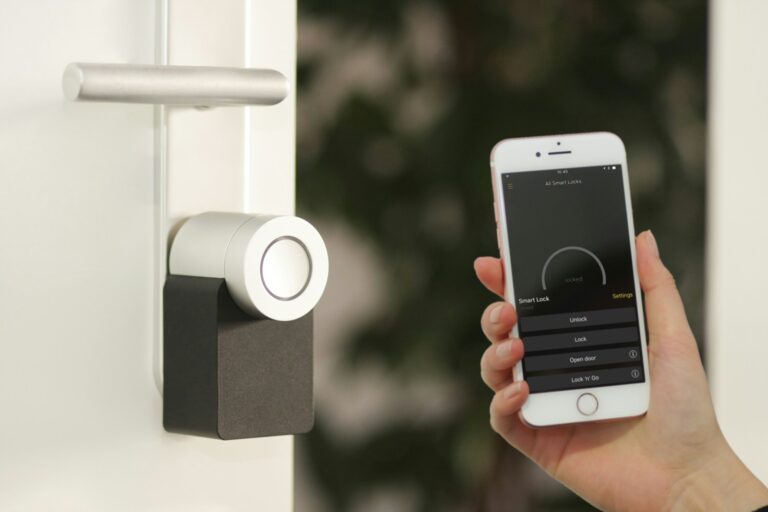
- Smart lock manipulation
- Spying through microphones
- Network breaches and data theft
Step 1: Secure Your Wi‑Fi Network (Most Important)
Your Wi‑Fi network is the front door to your smart home.
Best Practices
✅ Change the default router username and password
✅ Use WPA3 encryption (or WPA2 if WPA3 isn’t available)
✅ Create a strong, unique Wi‑Fi password
✅ Disable WPS (Wi‑Fi Protected Setup)
✅ Rename your SSID (avoid using your name or address)
Bonus Tip
- Use a separate network for smart devices if your router supports it.
Step 2: Create a Separate Network for Smart Devices
Why This Matters
If one smart device is hacked, a separate network prevents attackers from accessing:
- Your computers
- Phones
- Personal files
- Banking data
How to Do It
- Enable a Guest Network or IoT Network
- Connect only smart devices to this network
- Keep phones and laptops on your main network
Step 3: Change Default Passwords on All Devices
Many smart devices are hacked simply because users never change the default password.
What to Do
✅ Change passwords during setup
✅ Use long, unique passwords (12+ characters)
✅ Never reuse passwords
✅ Use a password manager if possible
If a device doesn’t allow password changes, reconsider using it.
Step 4: Enable Two‑Factor Authentication (2FA)
Enable 2FA on:
- Smart home apps
- Cloud dashboards
- Manufacturer accounts (Google, Amazon, Apple, Samsung)
2FA prevents access even if your password is stolen.
Step 5: Keep Firmware and Apps Updated
Outdated firmware is one of the most common security holes.
Best Practices
✅ Enable automatic updates when available
✅ Check for updates monthly
✅ Remove devices that no longer receive updates
If a company stops supporting a device, it’s time to replace it.
Step 6: Buy Devices from Reputable Brands
Not all smart devices are equally secure.
What to Look For
✅ Regular firmware updates
✅ Transparent privacy policies
✅ Strong encryption
✅ Reputable brand history
Avoid:
- No‑name brands
- Devices with unclear data practices
- Products that require sketchy apps
Step 7: Limit Device Permissions
Many devices request more access than they need.
Review Permissions
- Disable microphones when not needed
- Turn off cameras when away
- Restrict location access
- Disable cloud recording if not required
Step 8: Secure Smart Cameras and Doorbells
Cameras are among the most targeted devices.
Camera Security Tips
✅ Change default camera passwords
✅ Disable remote viewing if unnecessary
✅ Use strong encryption
✅ Avoid exposing cameras directly to the internet
✅ Position cameras away from private areas
Step 9: Monitor Network Activity
Use your router or security app to:
- View connected devices
- Identify unknown devices
- Block suspicious activity
Some routers and apps provide intrusion detection alerts.
Step 10: Disable Unused Features
Many devices enable risky features by default.
Turn OFF:
- Remote access (if unused)
- UPnP
- Voice purchases
- Public sharing links
- Unused integrations
Step 11: Protect Voice Assistants
Smart speakers can be abused if unsecured.
Best Practices
✅ Disable voice purchasing
✅ Set up voice recognition
✅ Review voice history regularly
✅ Mute microphones when not in use
Step 12: Use a Firewall or Smart Home Security Hub
Advanced users may benefit from:
- Hardware firewalls
- Smart home security hubs
- Network intrusion detection systems
These provide:
- Traffic filtering
- Attack alerts
- Device isolation
Signs Your Smart Home May Be Hacked
🚩 Devices turning on/off by themselves
🚩 Unknown devices on your network
🚩 Camera movement without input
🚩 Strange sounds from speakers
🚩 Login alerts from unknown locations
What to Do If You Suspect a Hack
- Disconnect affected devices immediately
- Change all passwords
- Update firmware
- Reset compromised devices
- Check router logs
- Contact device manufacturer support
Smart Home Security Checklist
✅ Secure Wi‑Fi
✅ Separate IoT network
✅ Strong passwords
✅ 2FA enabled
✅ Regular updates
✅ Trusted brands only
✅ Monitor network activity
Final Thoughts
A smart home doesn’t have to be an easy target. Most hacks succeed because of simple mistakes, not advanced attacks. By following these steps, you drastically reduce the risk of unauthorized access and protect your privacy.
Smart security isn’t about perfection—it’s about layers of protection.
Key Takeaways
- Secure your Wi-Fi network with strong encryption and consider creating a separate network just for smart devices.
- Regularly update device firmware and replace outdated devices that no longer receive security patches.
- Enable multi-factor authentication and use unique, complex passwords for all smart home accounts and devices.
Understanding the Risks of Smart Homes
Smart home devices offer convenience but can expose you to security threats if not properly protected. These connected devices have unique vulnerabilities that hackers can exploit to gain access to your personal information or even your entire home network.
The Threat Landscape for Connected Devices
Smart devices create multiple entry points for cybercriminals to target your home. Each connected device—from thermostats to doorbell cameras—represents a potential weak link in your security chain. Hackers often look for the easiest way into your network, and outdated devices are prime targets.
Many attacks involve malware specifically designed to infect Internet of Things (IoT) devices. These malicious programs can:
- Turn your devices into part of a botnet
- Extract personal data
- Monitor your daily activities
- Create backdoors for future access
Security researchers have identified increasing sophistication in attacks targeting smart homes. Hackers no longer need to be tech experts, as hacking tools become more accessible and user-friendly.
Common Vulnerabilities in Smart Home Devices
Most security issues in smart homes stem from easily preventable problems. Weak default passwords remain one of the biggest vulnerabilities. Many users never change the factory-set credentials, creating an easy access point for intruders.
Manufacturers sometimes prioritize convenience over security, shipping products with:
- Unencrypted data transmission
- Minimal authentication requirements
- Limited or no security update support
Delayed or missing security patches create significant risks. When manufacturers stop providing firmware updates, devices become permanently vulnerable to newly discovered exploits. This “planned obsolescence” approach to smart devices leaves many homes exposed.
Network segmentation is critical but often overlooked. Keeping smart home devices on the same network as your personal computers and phones allows attackers who breach one device to access everything.
Securing Your Wi-Fi Network
Your Wi-Fi network serves as the gateway to all your smart devices, making it the first line of defense against potential hackers. Properly securing this network prevents unauthorized access and protects your personal data.
Creating a Separate Network for Smart Devices
Setting up a separate network for your smart home devices isolates them from your main network. This approach significantly reduces risk if one device becomes compromised.
Most modern routers support creating a guest network specifically for this purpose. When a smart device is hacked on a separate network, attackers can’t easily access computers, phones, or other devices containing sensitive information.
Configuration steps typically include:
- Accessing router settings through the admin portal
- Enabling guest network functionality
- Setting a different password from the main network
- Disabling guest-to-guest communication if available
Users should regularly update all network passwords every 3-6 months. The ideal setup includes unique, complex passwords for each network to maximize security.
The Importance of a Strong Firewall
A robust firewall monitors and controls incoming and outgoing network traffic based on predetermined security rules. It acts as a barrier between a trusted internal network and untrusted external connections.
Many routers come with built-in firewall protection, but users should verify these settings are enabled. Advanced users might consider dedicated hardware firewalls for enhanced protection.
Key firewall settings to configure include:
- Enabling stateful packet inspection
- Blocking unsolicited incoming connections
- Setting up port forwarding only when absolutely necessary
- Keeping firewall firmware updated
Regular security audits help identify potential vulnerabilities. Users should check firewall logs periodically to monitor for suspicious activity targeting smart devices.
Benefits of Using a VPN for Your Smart Home
A Virtual Private Network (VPN) creates an encrypted connection that shields internet activity from potential surveillance or interception. This provides an additional layer of security for smart home systems.
When accessing smart home devices remotely, a VPN prevents hackers from intercepting commands or viewing sensitive data. This protection is especially important when connecting via public Wi-Fi networks.
VPN advantages include:
- Data encryption making information unreadable to interceptors
- IP address masking hiding the user’s true location
- Reduced tracking from internet service providers and advertisers
- Protection against man-in-the-middle attacks that could compromise device control
Many reputable VPN services offer router-level installation, ensuring all home network traffic gains these protections automatically. This comprehensive approach secures not just individual devices but the entire smart home ecosystem.
Device-Level Security Measures
Protecting individual smart devices is essential to creating a secure smart home network. Each device represents a potential entry point for hackers, making proper configuration and maintenance critical security components.
Regular Software Updates and Security Patches
Smart home devices receive regular firmware and software updates that address security vulnerabilities. Manufacturers often release patches when they discover security flaws that could be exploited by hackers.
Many devices can be set to update automatically. This setting should be enabled whenever possible to ensure continuous protection. For devices without automatic updates, owners should check for new software versions at least once a month.
Outdated firmware is one of the most common vulnerabilities hackers exploit in smart home devices. Some older smart devices may eventually lose update support, at which point they should be considered for replacement with newer, more secure models.
Create a schedule or calendar reminder to verify all devices are running current software versions. This simple habit significantly reduces security risks.
Managing Account Information and Passwords
Default passwords are the first thing hackers try when attempting to breach smart devices. Always change factory-set passwords immediately after installation.
Each device should have a unique, strong password containing:
- At least 12 characters
- A mix of uppercase and lowercase letters
- Numbers and special characters
- No personal information or common words
Password managers can help create and store complex passwords securely. Many experts recommend using a password manager to maintain different passwords for each device without having to memorize them all.
Enable two-factor authentication (2FA) whenever available. This adds an extra layer of security beyond just the password, typically requiring a time-limited code sent to your phone or email.
Regularly review which accounts have access to your devices and remove any unused or unnecessary permissions.
Using Biometrics for Enhanced Security
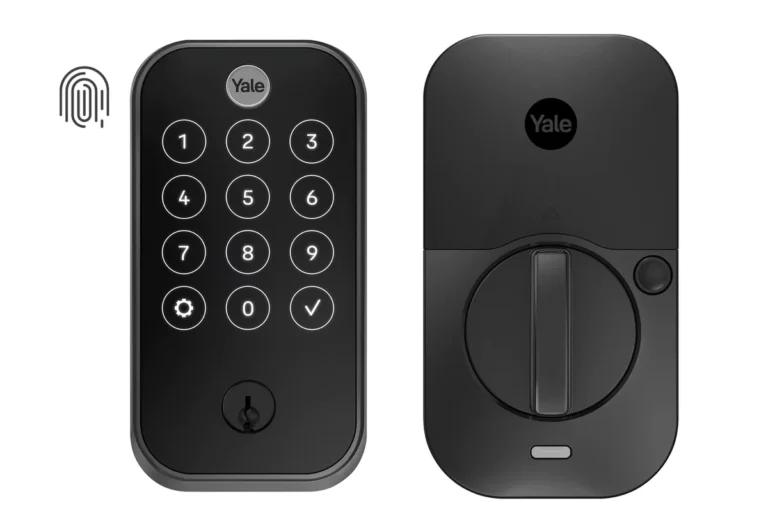
Biometric security features offer convenience while maintaining strong protection. Fingerprint scanning, facial recognition, and voice identification provide access control that’s difficult for hackers to bypass.
Many smart home hubs and security systems now support biometric authentication. This technology is particularly useful for securing access to critical smart home controls and sensitive information.
When selecting new devices, consider those with built-in biometric capabilities. Though typically more expensive, they offer significantly improved security over password-only systems.
Be aware that biometric data must be stored securely. Check manufacturer privacy policies to understand how your biometric information is protected and whether it’s stored locally on the device or in the cloud.
Set up backup access methods in case biometric systems fail. This could include PIN codes or traditional passwords as secondary options.
Protective Strategies Against Malware
Securing your smart home against malware requires both preventive measures and quick response capabilities. Malicious software can compromise your devices, potentially giving hackers access to your personal information or control of your smart home system.
Implementing Malware Protection
Start by using only reputable smart home technology brands that regularly update their security features. These established companies typically have better security protocols built into their products.
Install antivirus and anti-malware software on all compatible smart home devices. Many people forget that smart TVs, media players, and hubs can benefit from this protection.
Keep all device firmware and software updated. Manufacturers release updates specifically to patch security vulnerabilities that malware might exploit.
Consider these additional protective measures:
- Enable automatic updates whenever possible
- Use content filtering on your router to block known malicious websites
- Install ad-blockers to prevent malvertising threats
- Create a separate network for smart devices to isolate them from your main computers
Detecting and Responding to Infections
Monitor device behavior for unusual activity. Sudden performance drops, strange network traffic, or devices operating without commands may indicate malware infection.
Set up alerts for unexpected device access or configuration changes. Many smart home systems offer notification options that can warn of potential breaches.
If you suspect malware infection, take immediate action:
- Disconnect the affected device from your network
- Reset the device to factory settings if possible
- Change passwords for all connected accounts
- Check other devices on the network for similar issues
- Ensure your router’s firewall is activated and properly configured
Run regular security scans across your smart home ecosystem. Many security apps can scan your network to identify vulnerable devices before they become compromised.
Monitoring and Managing Access
Keeping track of who can control your smart devices is crucial for maintaining a secure smart home. Regular monitoring helps detect unusual activities before they become serious problems.
Secure Video Doorbell Practices
Video doorbells are often the first line of defense for your smart home. They need special attention to prevent unauthorized access. Update the firmware regularly to patch security vulnerabilities as they’re discovered.
Enable two-factor authentication if your video doorbell supports it. This adds an extra layer of security beyond just a password.
Check your doorbell’s privacy settings. Limit how much data is shared with the manufacturer and adjust motion detection zones to reduce false alerts.
Review stored footage periodically and delete unnecessary recordings. Many hackers target stored video because it might contain sensitive information about your daily routine.
Consider using local storage options rather than cloud-based solutions when possible. This reduces the risk of footage being intercepted during transmission.
Controlling Guest Access to Smart Devices
Set up a dedicated guest network for visitors instead of sharing your main Wi-Fi password. This keeps your primary network and connected smart devices isolated from potential threats.
Use temporary access codes for smart locks and security systems when friends or service providers need entry. Set these to expire after a specific time or date.
Many smart home hubs offer user management features. Create different access levels: family members might get full control while occasional visitors receive limited permissions.
Monitor device activity for unexpected commands or access attempts. Most smart home apps provide activity logs that show who accessed what device and when.
Review and revoke access periodically, especially for people who no longer need it. Old guest accounts are common security vulnerabilities that attackers exploit.
Frequently Asked Questions
Smart home security involves several critical components that help protect your devices and personal information from cyber threats. Here are answers to common questions about keeping your smart home secure.
What are the best practices for securing smart home devices?
Setting up strong, unique passwords for each device is essential for smart home security. Use a password manager to keep track of all your credentials.
Regularly update firmware on all your devices. Manufacturers release updates that fix security vulnerabilities, so keeping software current is crucial for protection.
Consider purchasing devices only from reputable brands with good security records. These companies typically offer better security features and longer support for their products.
What steps can be taken to enhance the cybersecurity of IoT devices in a smart home?
Creating a separate guest network specifically for smart devices helps isolate them from computers and phones that contain sensitive information. This network segmentation prevents hackers from accessing personal data if a smart device is compromised.
Disable features you don’t use, especially remote access capabilities when not needed. Fewer active connections mean fewer opportunities for attackers.
Consider implementing a dedicated smart home hub rather than connecting devices individually. This creates an additional security layer between your devices and potential threats.
Which security risks should homeowners be aware of when using smart home technology?
Unsecured Wi-Fi networks pose a significant threat, as they allow attackers to intercept data transmitted between devices. Always secure your Wi-Fi network with strong encryption.
Outdated devices with security flaws present vulnerabilities that hackers actively exploit. Manufacturers eventually stop supporting older models, leaving them permanently vulnerable.
Third-party integrations can introduce additional risks. Be selective about which services you connect to your smart home ecosystem, as each connection potentially increases vulnerability.
How can encryption be used to protect smart home devices from unauthorized access?
Enabling WPA3 encryption on your router provides the strongest available protection for your home network. This makes it significantly harder for attackers to crack your network password.
Look for devices that offer end-to-end encryption for data transmission. This ensures information remains protected even if intercepted during transmission between devices.
For voice assistants and smart speakers, use encryption for voice commands where available. Some systems now offer encrypted processing of voice data for enhanced privacy.
In what ways can a homeowner monitor their smart home devices to prevent potential hacking?
Regularly review connected device lists in your router settings to identify unauthorized devices. Unknown connections could indicate someone has gained access to your network.
Monitor network traffic patterns using tools provided by some routers or security systems. Unusual data transmissions might signal a compromised device.
Set up alerts for login attempts and device activity. Many smart home systems can notify homeowners when devices are accessed or when settings are changed.
What are the recommendations for creating secure passwords and authentication methods for smart home ecosystems?
Use long, complex passwords with a mix of uppercase letters, lowercase letters, numbers, and special characters. Avoid using personal information that could be easily guessed.
Implement two-factor authentication whenever available. This adds an extra security layer by requiring something you know (password) and something you have (like a phone).
Change default usernames and passwords immediately after installation. Manufacturers’ default credentials are widely known and often the first thing hackers try when attempting to access devices.