When you’re out hiking, traveling, or simply exploring a new area, having a reliable compass can be essential. Your iPhone already has powerful sensors that can be utilized by the right app to provide accurate directional information. With many options available on the App Store, finding the best compass app for your needs can make navigation much easier.
The best compass apps for iPhone combine accurate readings with useful features like offline functionality, altitude measurements, and easy-to-read displays that work well in various lighting conditions. Whether you’re a casual user who occasionally needs direction or an outdoor enthusiast who regularly navigates unfamiliar terrain, having a quality compass app installed can help you stay oriented and confident in your travels. Many of these apps also offer additional tools like GPS coordinates and map integration that extend their usefulness beyond basic compass functionality.
1: Compass° App
The Compass° app is a standout choice for iPhone users looking for navigation help. This app features a clean, minimalist design that makes it incredibly easy to use even for beginners.
What makes this app special is its super simple interface with a large display showing your direction and heading. You can quickly check your orientation without struggling to interpret complex information.
The app works offline, which is perfect when you’re hiking or traveling in areas with poor reception. You won’t need to worry about losing your way when cell service disappears.
Navigation becomes more intuitive with this app’s straightforward approach. The large compass display gives you clear directional information at a glance, helping you maintain your bearings in unfamiliar territory.
You’ll appreciate how the app doesn’t drain your battery like many other navigation tools. This efficiency makes it reliable for longer journeys when preserving battery life is crucial.
The Compass° app complements your iPhone’s built-in compass capabilities but offers a more user-friendly experience. The enhanced readability makes a significant difference when you need quick directional information.
Whether you’re an outdoor enthusiast or simply someone who occasionally needs navigation assistance, this app provides the perfect balance of simplicity and functionality.
2: Spyglass Navigation
Spyglass stands out as a powerful navigation tool for your iPhone. This app goes beyond basic compass functionality, offering a complete package for outdoor enthusiasts and travelers alike.
When you need reliable navigation, Spyglass delivers with its advanced GPS capabilities and offline maps. You can use it confidently even when traveling in remote areas without cell service.
The app functions as several tools in one. You get a high-tech compass, binoculars, and a heads-up display all integrated into a single interface.
What makes Spyglass special is its augmented reality features. You can overlay navigation information on your camera view, making it easier to identify landmarks and stay on course.
Many users praise Spyglass for its accuracy and reliability. One Reddit user mentioned it’s “amazing” and “one of the first apps I bought for my phone ages ago.”
You’ll find Spyglass available on the App Store for your iPhone and iPad. It’s also available for Android devices if you use multiple platforms.
The app works well for various activities including hiking, boating, off-road driving, and even aircraft navigation. You can customize it to suit your specific outdoor needs.
While Spyglass isn’t free, many users find its comprehensive features justify the cost. The offline functionality alone provides peace of mind when exploring unfamiliar territory.
3: iPhone Built-in Compass
Did you know your iPhone already has a powerful compass app built right in? Many iPhone users overlook this handy tool that comes pre-installed on every device.
The iPhone’s built-in Compass app offers reliable navigation without needing to download anything extra. You can access it from your home screen or by searching “Compass” in your phone’s search bar.
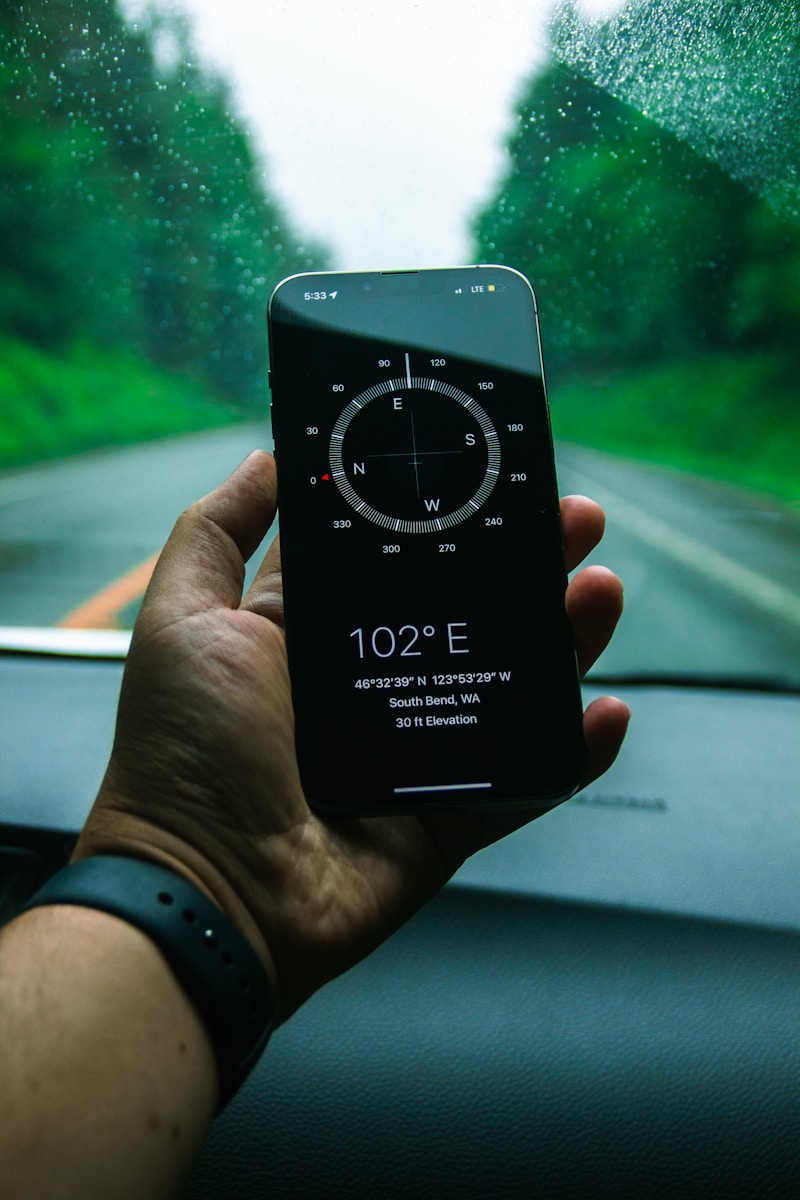
This app shows your current direction with a traditional compass display. It also displays your exact coordinates, elevation, and incline information, making it perfect for hiking or finding your way in unfamiliar places.
One major advantage of the built-in Compass is that it works without internet connection, making it extremely valuable when traveling in remote areas. You can navigate confidently even without data service.
The interface is clean and easy to understand. The app shows degrees and cardinal directions clearly, helping you orient yourself quickly in any situation.
For added functionality, the Compass app integrates with Apple Maps. This connection allows you to set and follow bearings to specific destinations with greater accuracy.
Recent iOS updates have improved the Compass app’s accuracy and added new features. The level function helps you ensure surfaces are perfectly flat, adding another practical use to this versatile tool.
While not as feature-rich as some specialized apps, the iPhone’s built-in Compass provides reliable basic navigation that meets most users’ needs without taking up additional storage space.
4: Best Compass™
Best Compass™ is one of the top navigation apps available for iPhone users. This app does more than just show direction – it provides detailed location information that can be very helpful when you’re exploring.
When you open Best Compass™, you’ll immediately notice its clean interface. The app displays your latitude and longitude and gives you information about your current location.
One standout feature is the elevation data. This can be particularly useful when you’re hiking or doing outdoor activities where altitude matters. You don’t need to wonder how high up you are anymore.
The app works well even in areas with poor cell reception. This reliability makes it a good choice for wilderness adventures or travel to remote locations where connectivity might be an issue.
You’ll find the directional readings are accurate and responsive. The compass adjusts quickly as you change direction, giving you real-time guidance as you navigate.
Best Compass™ offers both basic and advanced features that suit different needs. Whether you’re a casual user who just needs simple directions or someone who requires detailed navigation data, this app can accommodate your requirements.
The interface is intuitive enough that you won’t need to spend much time learning how to use it. Most functions are self-explanatory, making it accessible even if you’re not tech-savvy.
5: Compass Pro
Compass Pro is a standout navigation tool for your iPhone that helps you find direction precisely. This professional compass app offers excellent orientation capabilities wherever you are.
With Compass Pro, you can see your direction clearly and match it with satellite imagery. This makes it easier to understand exactly where you’re facing when exploring unfamiliar terrain.
The app provides comprehensive directional information in an easy-to-read interface. You won’t need to struggle with confusing controls or unnecessary features when you simply need to know which way is north.
For outdoor enthusiasts, Compass Pro serves as a reliable navigation companion. You can trust its accuracy when hiking, camping, or exploring new areas without cellular service.
The clean design focuses on functionality rather than flashy graphics. This approach ensures battery efficiency while delivering the essential directional data you need.
Unlike the basic compass that comes with your iPhone, Compass Pro offers enhanced features for more serious navigation needs. The interface is intuitive enough for beginners yet powerful enough for experienced outdoor navigators.
The app works offline, meaning you can rely on it even when exploring remote locations without internet access. This makes it particularly valuable for backcountry adventures where connectivity isn’t guaranteed.
6: Compass∞
Compass∞ is a practical and accurate compass app that stands out for its ease of use and readability. It’s designed for outdoor activities like hiking, camping, backpacking, and road trips.
When you’re looking for something lightweight and intuitive, Compass∞ delivers excellent performance. The app is known for its super intuitive interface that makes navigation quick and straightforward.
One of the biggest advantages you’ll notice is the minimal battery consumption. The app has almost zero battery drain, which is crucial when you’re outdoors for extended periods and need to conserve your iPhone’s power.
The clean display gives you directional information at a glance. You won’t have to struggle with complicated controls or cluttered interfaces when you need quick bearings during your adventures.
Compass∞ provides the essential navigation functions without overwhelming you with unnecessary features. This focused approach keeps the app running smoothly and makes it accessible even for first-time compass app users.
You’ll appreciate how quickly the app loads and responds when you’re in a hurry to check your direction. Whether you’re on a trail or finding your way in an unfamiliar city, the straightforward guidance helps you stay on course.
7: The Best Compass & GPS
The Best Compass & GPS is a highly rated iPhone app that offers more than just basic directional information. This app easily measures your phone’s altitude and works effectively even without an internet connection.
You’ll appreciate the offline functionality when hiking in remote areas or traveling internationally. The app provides accurate directional data using your iPhone’s built-in sensors, making it reliable in various situations.
Many users find that having a dedicated compass app is preferable to using the default iPhone compass. The Best Compass & GPS offers a cleaner interface and additional features that outdoor enthusiasts value.
The app combines traditional compass functionality with GPS capabilities, allowing you to pinpoint your location and orientation simultaneously. This dual functionality makes it particularly useful for hiking, camping, and other outdoor activities.
When comparing compass apps, consider how the interface works for your specific needs. The Best Compass & GPS presents information clearly without overwhelming you with unnecessary details.
You can download The Best Compass & GPS from the App Store. It’s worth considering if you’re looking for a reliable navigation tool that doesn’t depend on cellular service.
8: Google Maps Compass
Google Maps offers a built-in compass feature that many iPhone users overlook. This compass works within the app to help you navigate in real-time during your travels.
To access the compass in Google Maps, simply start navigation mode. You’ll notice a small compass icon appears in the corner of your screen. Tap it to orient the map according to your current direction.
The Google Maps compass uses your iPhone’s internal magnetometer to determine your facing direction. While not as feature-rich as dedicated compass apps, it provides practical functionality when you’re already using the app for navigation.
One advantage of using Google Maps is that it combines compass directions with your GPS location. This means you can see both where you are and which way you’re facing on the same screen.
The compass in Google Maps works offline too, as long as you’ve downloaded the map area beforehand. This makes it useful for hiking or traveling in areas with poor cell service.
Unlike dedicated compass apps that show detailed angular measurements, Google Maps compass is designed primarily for general orientation. It shows you which way is north and helps you face the right direction for your journey.
For basic navigation needs, the Google Maps compass may be all you need without downloading another app. It’s particularly helpful when walking in unfamiliar cities where knowing your orientation can help you follow directions more easily.
9: MapQuest Compass
MapQuest Compass offers a reliable navigation option for iPhone users looking for a straightforward compass app. The app combines traditional compass functionality with MapQuest’s mapping capabilities.
You’ll find the interface clean and user-friendly, making it easy to get your bearings quickly. The digital compass display shows your current heading with clear, readable numbers and a traditional compass rose design.
One of the standout features is the integration with MapQuest’s mapping system. This means you can see your current location on a map while also getting compass readings, which is helpful for hikers and travelers.
The app uses your iPhone’s built-in sensors to provide accurate direction information. You may need to calibrate it occasionally by moving your phone in a figure-eight pattern for best results.
MapQuest Compass includes options for displaying coordinates in different formats. You can view your position in decimal degrees or degrees/minutes/seconds depending on your preference.
Battery consumption is relatively modest compared to some other navigation apps. This makes it practical for longer outdoor adventures where power conservation matters.
The app works offline for basic compass functions, though you’ll need data connection to access the full mapping features. This balance makes it versatile for various situations where you might need direction assistance.
While not as feature-rich as some specialized outdoor navigation apps, MapQuest Compass delivers reliable performance for everyday direction finding needs.
10: Altimeter GPS Pro
Altimeter GPS Pro stands out as an excellent compass app for your iPhone with multiple functions beyond just direction finding. It helps you discover your exact location, altitude, direction, and even atmospheric pressure on a map.
You can easily view your geographic coordinates and address with this powerful tool. The app combines altimeter functions with compass features, making it ideal for outdoor adventures.
One of the most useful features is the ability to save altitude measurements for different locations on your map. This helps you track elevation changes during hikes or compare different locations you’ve visited.
The app uses your iPhone’s GPS system for basic measurements. If you have a newer iPhone model like the iPhone 6/6+ or later, Altimeter GPS Pro can take advantage of the high-fidelity barometric pressure sensor for more accurate altitude readings.
For outdoor travelers, this app provides essential information at a glance. You’ll appreciate the clean interface that displays critical data without overwhelming you with unnecessary details.
The app is available on the App Store and works well for hiking, mountain climbing, or any activity where knowing your altitude and direction matters. You’ll find it particularly helpful when navigating unfamiliar terrain or when you need precise location data during your adventures.
Features of Compass Apps
Modern iPhone compass apps offer a range of useful features beyond simple direction finding. These tools have evolved to include specialized navigation options and integration with other location services.
Magnetic vs True North
When using a compass app on your iPhone, you’ll notice options for both magnetic and true north. Magnetic north points to Earth’s magnetic pole, which shifts slightly over time. True north points to the geographic North Pole.
The difference between these two measurements is called declination. This varies depending on your location on Earth. Quality compass apps allow you to switch between both readings.
For casual hiking, magnetic north often works fine. For precise navigation or when following map bearings, true north settings are essential. Professional navigators and wilderness explorers typically prefer true north.
Most advanced compass apps automatically calculate the declination angle for your current location. This saves you from making manual adjustments that could lead to navigation errors.
Integration with Maps
Modern compass apps don’t exist in isolation – they work alongside mapping features. The best apps display your coordinates in various formats including latitude/longitude and military grid reference system (MGRS).
This integration provides several benefits:
- Direction overlay on satellite imagery
- Real-time position tracking
- Ability to set waypoints and navigate to them
- Elevation data display
You can use the iPhone’s built-in Compass app for basic navigation even without an internet connection. This makes it valuable for travel in remote areas.
Premium compass apps like Compass Pro offer enhanced integration that matches compass direction with satellite imagery. This allows you to orient yourself with both digital and traditional navigation methods simultaneously.
Choosing the Right Compass App
Finding the perfect compass app for your iPhone involves considering both usability and technical performance. The right app will offer an intuitive interface while maintaining reliable accuracy in various conditions.
User Interface and Ease of Use
A compass app should be straightforward to use, especially when you’re outdoors or in unfamiliar territory. Look for apps with clean, uncluttered displays where cardinal directions are clearly visible even in bright sunlight.
The best compass apps offer additional location information without overwhelming the screen. Consider whether you prefer traditional compass styling or modern digital interfaces.
Apps like Compass∞ are praised for being “simple, super intuitive, and extremely lightweight” with minimal battery drain—an important factor during extended outdoor activities.
Check that navigation controls are accessible with one hand, as you’ll often be holding your phone while moving. Some apps offer customizable displays so you can prioritize the information most relevant to your needs.
Accuracy and Calibration
Accuracy is crucial when relying on a compass app for navigation. Your iPhone’s built-in compass sensor requires proper calibration to function correctly, so choose an app that guides you through this process.
Professional-grade compass apps often include features to help you orientate yourself optimally at your location, matching compass directions with satellite imagery for better context.
Consider apps that display both magnetic north and true north options. The most reliable apps will provide GPS coordinates and elevation data alongside basic directional information.
Remember that the iPhone’s compass works without an internet connection, making it an excellent offline navigation tool. However, some enhanced features like detailed maps might require occasional data access.
Test your chosen app in different environments before relying on it completely. Metal objects, electronic devices, and certain structures can interfere with compass readings.
Frequently Asked Questions
iPhone users have many questions about compass apps. These questions cover everything from accuracy to special features for outdoor activities.
What are the top-rated compass apps available for the iPhone?
The top-rated compass apps for iPhone include Compass° App, Spyglass Navigation, and Best Compass™. These apps have high user ratings and positive reviews.
Compass° App offers a clean interface with accurate readings. Spyglass Navigation provides advanced features for serious outdoor enthusiasts.
The iPhone’s Built-in Compass is also highly rated for its simplicity and integration with other Apple services.
Which compass app offers the most accurate readings on an iPhone?
Spyglass Navigation is often considered the most accurate compass app for iPhone. It uses multiple sensors to provide reliable readings even in challenging conditions.
The Best Compass™ app also offers excellent accuracy and works offline which is helpful for remote areas.
Proper calibration greatly improves accuracy with any compass app. You can calibrate your iPhone compass through Settings > Privacy > Location Services > System Services.
How do iPhone users rate the default Compass app compared to third-party options?
iPhone users generally rate the default Compass app well for basic needs. It provides reliable readings and doesn’t require additional downloads.
Third-party options like Compass Pro and Spyglass Navigation are rated higher by users who need specialized features. These apps offer more detailed information and customization options.
Some users prefer the simplicity of the built-in app, while others need the extra capabilities of third-party options.
Are there any free compass apps for iOS that provide additional features such as navigation or waypoint marking?
Yes, several free compass apps offer advanced features. The built-in iPhone Compass app now includes navigation capabilities in newer iOS versions.
Compass° App offers a free version with waypoint marking and basic navigation features. Some apps use a freemium model, providing basic functions for free and advanced features as in-app purchases.
For serious navigation needs, phone compass apps may not be as reliable as dedicated baseplate compasses for wilderness navigation.
Can iPad users benefit from compass apps designed for the iPhone, and if so, which ones?
iPad users can benefit from compass apps if their device has the necessary magnetometer sensor. Not all iPads have this hardware, so compatibility varies by model.
Spyglass Navigation and Best Compass™ work well on compatible iPads. These apps take advantage of the larger screen to display more information at once.
The experience is often better on newer iPad models with improved sensors for more accurate readings.
What should I consider when choosing a compass app for outdoor activities on my iPhone?
Battery consumption is crucial for outdoor activities. Look for apps with energy-efficient designs like Compass Pro or the built-in Compass app.
Consider whether you need offline functionality. Apps like The Best Compass & GPS work without cell service, which is essential in remote areas.
Durability features like water-resistant mode and night vision options are important for outdoor use. Experts suggest using a physical compass as a backup for safety during serious wilderness expeditions.